How Ad flow works
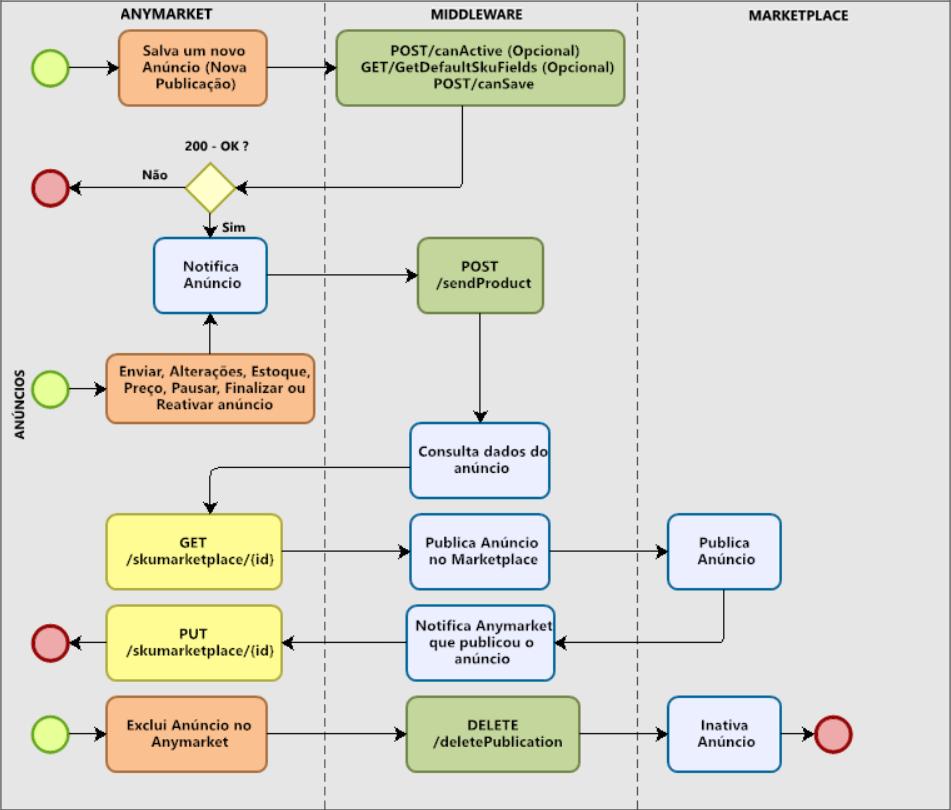
When the seller creates a new publication, the remote /canSave is triggered and this is where the marketplace can pre-validate the ad, before it is published. However, the Marketplace may not choose to carry out this pre-validation, in these cases it is enough for it to return a http - 200 OK and "responsebody = true" which is the information expected to proceed with the ad, as shown in the flow below.
After the seller clicks to confirm the publication, it will appear on the screen if he intends to send this publication to the Marketplace. If the seller clicks "YES", the remote /sendProduct comes into action, which is responsible for sending a notification to the marketplace through the middleware saying that an ad was created on ANYMARKET. If the seller clicks "NO", the publication is in Stand By state and the /sendProduct is not triggered until the publication is sent on the transmission screen, selecting the publication created and clicking the SEND button.
Every new publication creation, the STATUS information that will be triggered in the JSON of /sendProduct will always be "UNPUBLISHED", at that moment the marketplace will do a GET on the endpoint **/skumarketplace/{id} ** to fetch the transmission data and register the ad, and also perform a PUT on the endpoint /skumarketplace/{id} informing us of the STATUS of the publication in the marketplace, for example:
- Active;
- In cataloging;
- Publication under review;
It is expected that these actions occur synchronously.
About the types of Status in ANYMARKET click on this Link.
The /sendProduct remote will be fired whenever we have any creation or update of the transmission.
Updating Publication
Starting with the module we have a button “Update only price, stock and status?” that exists in the tab “Ads settings” that are represented by the attributes in the Json of /sendProduct;
- onlySyncPrice: boolean
- onlySyncStock: boolean
- onlySyncStatus: boolean
They refer to the module parameter where the seller can define that "Update only price, stock and status", so that when receiving this data as "false" the Marketplace must update all registration information, that is, consume the information such as title, description, images and etc, so that the ad has the same information that is on the product within the ANYMARKET.
On the other hand, when the information is "true", it means that the seller has defined that after sending the advertisement, any new update must only be updated "Price, stock and status".
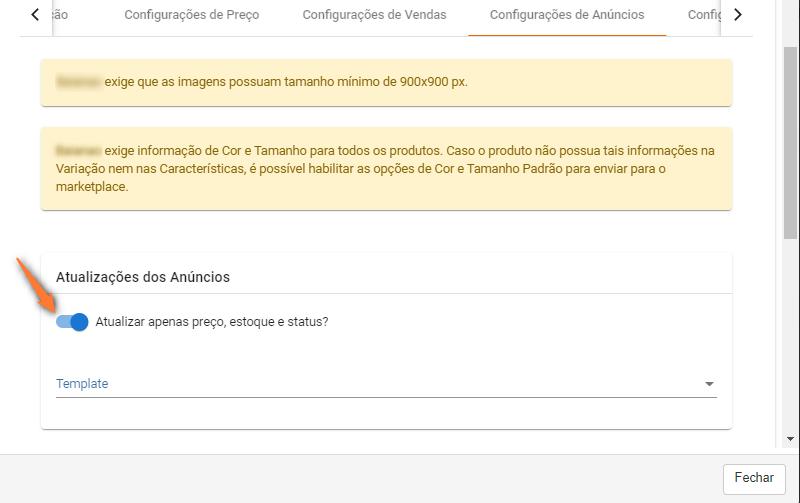
If the module flag is "Enabled" (onlySyncStatus,onlySyncPrice,onlySyncStock = true) the Marketplace does not need to trigger the endpoint: /skumarketplace/{id}, but the endpoint ** /skumarketplace/{id}/priceStock** having only the values relevant to the price of(price), price by(discountPrice) and stock(availableAmount);
Containing the responseBody:
{
    "id": 62325,
    "skuInMarketplace": "22222",
    "idInMarketplace": "62325",
    "price": 59.9,
    "discountPrice": 43.93,
    "availableAmount": 100
}
If the ad has had a stock, price or status update they will be mapped in the following attributes of the /sendProduct json:
- updateStatus": boolean
- updatePrice": boolean
- updateStock": boolean
If the ad has undergone a stock update, it will be triggered:
{
"idSkuMarketplace": 123456,
"idSkuMarketplaceMain": 1234567,
"status": "ACTIVE",
"onlySync": true,
"idSku": 251231,
"availableAmount": 1000,
"idAccount": 25,
"idProduct": 222222,
"skuInMarketplace": null,
"onlySyncPrice": true,
"onlySyncStock": true,
"onlySyncStatus": true,
"updateStatus": false,
"updatePrice": false,
"updateStock": true
}
According to the update scenarios, if the marketplace api has different routes for each update, it will not need to trigger two routes whenever /sendProduct is triggered, knowing in fact what to update according to the parameters sent or even withdrawing the need to compare the values to perform the update.
Using the /skumarketplace/{id}/priceStock endpoint can also be used for performance purposes as less data is returned, making it an optional endpoint.
Deleting a Publication
DELETE /deletePublication
This remote is activated when a publication is deleted in ANYMARKET, notifying the Marketplace that the publication is being removed from ANYMARKET and with that the Marketplace will no longer receive price and stock updates and consequently carry out the insertion of orders in the base.
Therefore, when the marketplace receives the notification, it is important that it inactivates the product for sales, thus avoiding out-of-stock sales and future problems.