Activation of the Integration Module
One of the first processes that we carry out internally as soon as we start an integration project with the Marketplace, is the creation of the Module. But what would this module be? In this topic we will bring more information about this screen in ANYMARKET and its operation via API.
What is the Integration Module?
In ANYMARKET, the Seller has access to a screen where he will list all the integrations with the Marketplaces that we have available, and this is where the Seller will activate and configure the integration.
As soon as we start the integration process with a new Marketplace on ANYMARKET, we submit a form and one of the information we request is:
- What is the fundamental data to authenticate a new customer?
This information is important for the construction of the customized Module screen for each Marketplace here at ANYMARKET, as it will be the Marketplace itself who will define which information will perform the Seller authentication.
Examples of authentications:
- Token + Password;
- Store ID;
- Username and Password;
- Token + Username and Password;
- Etc;
This information must be passed to the Seller, so that they can activate the integration via ANYMARKET. In the example print that we provide below, the Marketplace will control by Login and Password, so the authentication screen will have the Account Name field (Default field for all ANYMARKET module screens) and below the authentication fields (Login + Password) that the Marketplace has defined (Custom Fields).

Module screen behaviors
We will detail in this topic how the module screen works, which remotes will be activated and the return and actions expected in the integration.
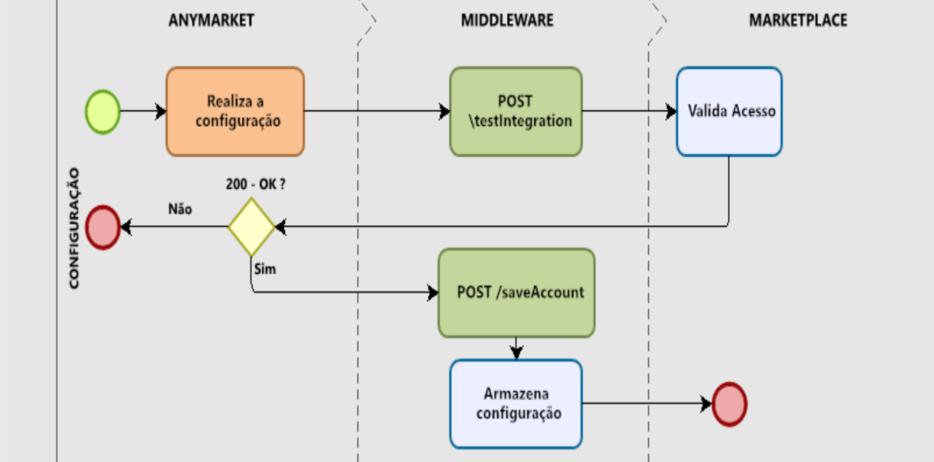
Based on the flow above, from the moment the Seller accesses the module screen and enters the information and clicks on the SAVE button, ANYMARKET will trigger the following information on the remote /testIntegration:
| Headers | |
|---|---|
| x-anymarket-token | JWT with the information for authentication in the middleware. |
JWT ANYMARKET example:
eyJ0eXAiOiJKV1QiLCJhbGciOiJSUzI1NiJ9.eyJpcCI6IjEwLjAuOS4xNzIiLCJvcmdhbml6YXRpb24iOiJBTllNQVJLRVQgVGVzdGUgLSBCcmFzaWwiLCJvaSI6IjIyNDQ5NTA0LiIsImV4cCI6MTYxMjc5MTI2NCwibG9naW4iOiJkYW5pbG8ub2xpdmVpcmFAZGIxLmNvbS5iciJ9.FKF8wRb97xZmpakGbkoYfO0cjIkj48rwcis4DOGlUEh4cD98sFRJTVfrmMOaAe-XrBoPvTWbSdJfNy81-_VMLq9dbcKpBPO8MfHDXmqWV7tuHT1BaIcOkYZl-uIvOMtxCmDiCrX1ny2DvjY_LLuzRjexM6CQw4rRt8NXZb3dGV4
This JWT contains the following information:
"organization" - Company name
"oi" - Organization ID, merchant's unique identifier; This field differentiates the sellers
"exp" - Token expiration time
"login" - User making the call; Can be used for auditing purposes
The middleware must be prepared to receive the token, verify its expiration and identify the signature with the ANYMARKET public key.
Request
{
	"id": null,
	"active": true,
	"templateId": 10,
	"accountName": "accountName",
	"discountType": "PERCENT",
	"useSandbox": true,
	"accountDefault": true,
	"priceFactor": 10.0,
	"discountValue": 5.0,
	"initialDateForOrderImport": "dd-MM-yyyy",
	"updatePriceStockStatus": true,
	"additionOfFreight": 0,
        "user": null,
	"login": "XXXXXXXX",
	"senha": "XXXXXXXX"
}
{
  "title": "testIntegration",
  "type": "object",
  "properties": {
    "id": {
      "type": "integer",
      "description": "Account Id"
    },
    "active": {
      "type": "boolean",
      "description": "Informs if the account is Active"
    },
    "templateId": {
      "type": "number",
      "description": ""
    },
    "accountName": {
      "type": "string",
      "description": "Account name entered by Seller"
    },
    "discountType": {
      "type": "string",
      "description": "Discount type (PERCENT or VALUE)"
    },
    "useSandbox": {
      "type": "boolean",
      "description": "If the account used is in Sandbox"
    },
    "accountDefault": {
      "type": "boolean",
      "description": "If it is the Default account"
    },
     "priceFactor": {
      "type": "number",
      "description": "Multiplier price factor (ADDITIONAL MARKUP)"
    },
    "discountValue": {
      "type": "number",
      "description": "Discount value"
    },
    "initialDateForOrderImport": {
      "type": "string",
      "format": "dd-MM-yyyy",
      "description": "Initial import date of orders."
    },
    "updatePriceStockStatus": {
      "type": "boolean",
      "description": "Defines whether only Price, Inventory and Status updates will be allowed"
    },
    "additionOfFreight": {
      "type": "integer",
      "description": "Additional value on top of the shipping table."
    },
    "user": {
      "type": "string",
      "description": "In this first moment it will be null, but in the saveAccount remote, it will have the Seller's Token information.."
    },
    "Login": {
      "type": "string",
      "description": "CUSTOM FIELD FOR SELLER AUTHENTICATION"
    },
    "senha": {
      "type": "string",
      "description": "CUSTOM FIELD FOR SELLER AUTHENTICATION"
    }
  }
}
Answers we expect
The Marketplace will verify the information entered in the predetermined fields, returning:
true
If the marketplace validates the information, we will trigger another call triggering the /saveAccount remote. At that moment, the Marketplace will store the settings that the Seller has made and the visual information via the screen will be set to Active.
{
  "id": 127,
  "active": true,
  "templateId": null,
  "accountName": "Seller_test",
  "discountType": "PERCENT",
  "useSandbox": false,
  "accountDefault": true,
  "priceFactor": 1,
  "discountValue": 0,
  "updatePriceStockStatus": true,
  "additionOfFreight": 0,
  "user": {
    "token": "LG1620824269786R9896699",
    "country": null
  },
  "initialDateOrderImport": "09-02-2022",
  "storeId": "123456",
  "password": "!@Teste"
}
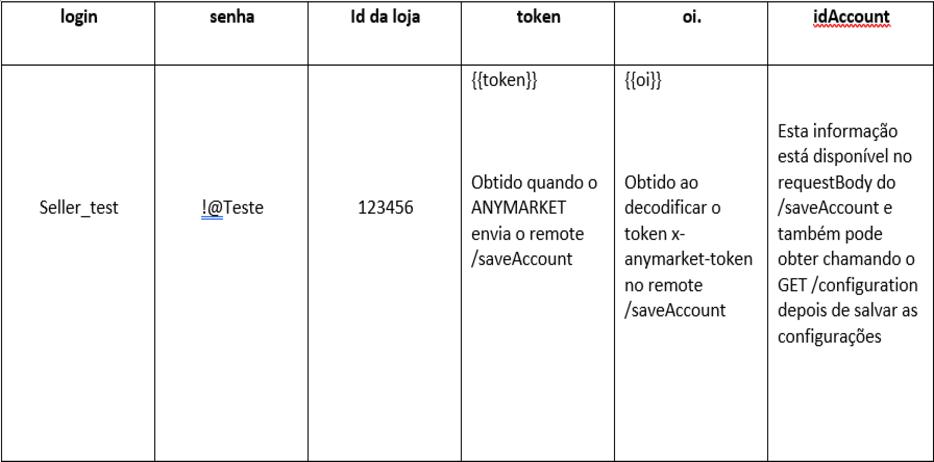
If the Marketplace does not identify the Seller who is activating the Module, the return we expect is:
false