Shipping Label Issuance
The /printtag endpoint is used to retrieve the labels made available by the Marketplaces.
Each Marketplace has specific formats in which labels can be generated.
- AliExpress = PDF OR ZPL
- Amazon = PDF and ZPL
- Americanas Marketplace (B2W) = JSON or PDF
- Carrefour = PDF
- Dafiti = PDF
- Decathlon = PDL and ZPL
- Digigrow = ZPL
- Falabella = PDF and ZPL
- Magalu = PDF and ZPL
- Mercado Livre = ZPL2, ZPL, JSON and PDF
- Netshoes = PDF and ZPL
- Olist = ZPL
- Paris = PDF
- Ripley = PDF
- Shopee = PDF OR ZPL
- Shein = PDF
- TikTok = PDF and ZPL
- Via = PDF
- Walmart = PDF and ZPL
Important
It is not possible to reissue a label that has already been generated for the Marketplaces (AMAZON, MAGAZINE LUIZA, and SHOPEE). Therefore, once the order label has been generated, the 'Issue label' button should not be available on screen, and via integration an error 400 will be returned with a message in the response body "Etiqueta já emitida".
To issue a label via API, a POST request must be made to the endpoint indicated
below, replacing {type} with the desired format (PDF, ZPL, ZPL2, JSON) in the URL: /v2/printtag/{type}
When the type is ZPL2, it is possible to provide the "file" expression in the Parameters, sending "TXT", "PLP" or "ZPL". When TXT is specified, a JSON is returned with the TXT content provided by the Marketplace; when PLP is specified, the response is a PDF with the PLP; when ZPL is specified, the response contains only the characters that make up the label's ZPL.
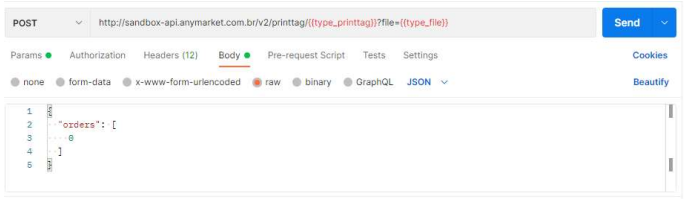
Important notes on label issuance for Americanas Marketplace (B2W)
B2W has two available formats: JSON (requires a decode by the integration) and PDF (a ZIP file is returned with the files ready to be printed, including the label + pre-shipping list PLP).
Important notes on label issuance for Dafiti
When querying the order details (metadata), the following field will appear in the JSON: needInvoiceXML: true
Documentation for label printing
For Dafiti Milkrun, the label printing flow automatically issues the manifest. Therefore, the last step of the seller's responsibility, in the Dafiti Milkrun modality, is the printing of labels. After this step, the order package collection will be underway.
Important note on Shopee label issuance
It is not possible to choose the Shopee label format in ANYMARKET. The seller must configure in the Shopee panel the format in which they want the labels issued, so that ANYMARKET simply replicates it.
Important notes on label issuance for more than 1 package
To issue more than one label for an order, it is necessary to send the desired number of labels in the "number-of-packages" field present in "metadata" when updating the order PUT "/v2/orders". Then, when querying the label at the endpoint /v2/printtag/{type}, the desired number of labels will be made available for download.
{
  "status": "INVOICED",
  "invoice": {
    "accessKey": "654215484654131321654685465461232135246546532131321"
    "series": "000001",
    "number": "12345678",
    "date": "2022-11-01T19:35:04-03:00",
  },
  "metadata": {
    "number-of-packages": "3",
  }
}
Note
The option for more than one label per order is available only via API and for certain marketplaces; it is not possible to perform this issuance through the screen interface.
The number of packages cannot be updated after it has been set.